This blog post is a collaboration between Max Mudde, Edwin Verheul and Joachim Opdenakker.
Network stress test
A new network – and, in particular, a wonderful collaboration with Nikhef to host one of the core sites – naturally calls for a festive opening. Read more about it here: https://www.surf.nl/nieuws/surf-brengt-hart-van-netwerk-terug-in-eigen-cooperatie
But as a techie, you naturally want the technology to speak for itself. In collaboration with Nikhef and Studenten Net Twente, we came up with the idea of routing ‘difficult’ traffic through the SURFnet Infinity network. This allowed us to display some impressive graphs during the ceremony, and afterwards, ‘just for fun’, to open this up to the public as a fun internet event.
But what exactly constitutes ‘heavy’ traffic? Gigabits? Terabits? Although we usually measure network capacity in bits per second, a router does not operate using bits. A router works with packets. Every packet, large or small, takes roughly the same amount of work: the router has to receive it, look up the destination, check whether the packet is allowed through, update counters and then forward the packet via the correct port. Whether that packet is 64 bytes or 1,500 bytes makes hardly any difference.
Normal internet traffic is a mix of large and small packets. To account for this, we generally use the concept of IMIX, or Internet Mix. This is a standard distribution of the traffic observed in practice on networks. If you take the average of this, you arrive at an average packet size of 350 to 400 bytes. A connection with a capacity of 400 gigabits per second, carrying IMIX traffic, means that the router has to process around 140 million packets per second.
But IMIX isn’t enough, of course; we want to show what the network is capable of. Enter: the pixelflut!
What is a ‘pixel flut’?
Imagine a huge digital painting that anyone on the internet can draw on at the same time. There’s no brush or mouse. You draw by sending messages via the internet. Each message colours a single pixel on the screen. You can follow the result live via a livestream. That’s a ‘pixelflut’. The idea comes from the hacker scene and is a regular feature at hacker events.
The screen is shared, so anyone can overwrite someone else’s work. If you want your drawing to stay on the screen, you have to keep resending your pixels – and do so faster than all the other ‘pingers’. This creates a fun, chaotic competition. Participants write clever programmes that send as many messages per second as possible. This makes a ‘pixelflut’ an excellent stress test for a network too.
What is a ping?
A ping packet is just about the smallest packet there is. In this SNT Ping Test, all the information is contained in the destination address, so the contents of the packet can remain empty. To fill that same 400 Gigabit per second connection with such ping packets, the router will have to process around 600 million packets per second. For the same volume of traffic, the router therefore has 4.28 times as much work to do as with IMIX traffic.
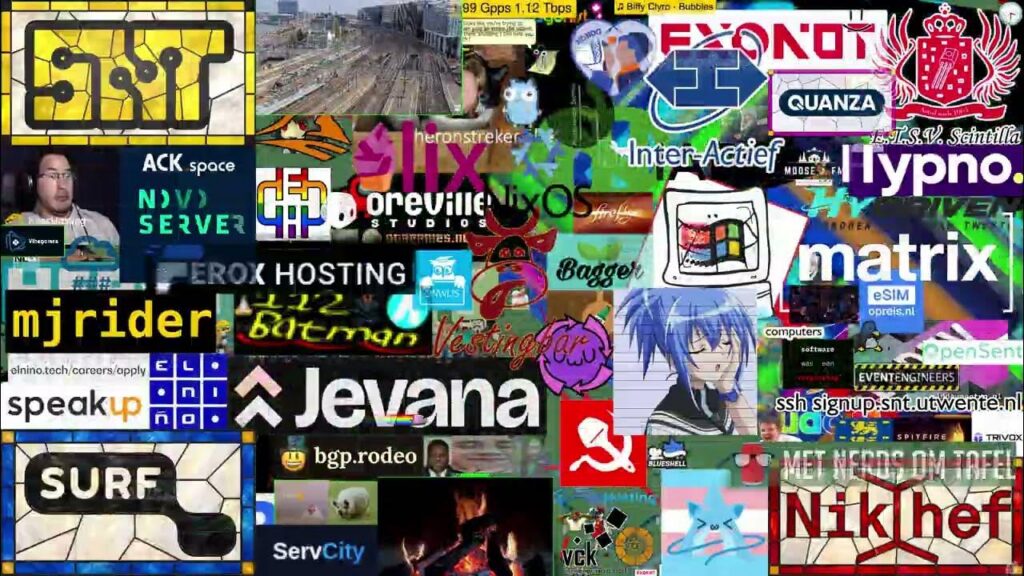
On a ‘normal’ pixel-based chat service, you send text commands to a server. Last weekend’s edition, SNTPings by Studenten Net Twente, works differently: there, you ‘draw’ using pings.
A ping is the simplest message you can send over the internet. It works a bit like shouting “Hello, are you there?” in a dark room. Your computer sends a small packet to an address. If that address exists and the device is reachable, a reply comes back. Network administrators have been using ping for decades to check whether a computer or server is reachable and how fast the connection is. Virtually every computer has a built-in ping command.
How does a ping become a coloured pixel?
The trick lies in the address you send the ping to, not in the contents of the packet.
Every device on the internet has an IP address, which is similar to a postal address. The latest version, IPv6, has extremely long addresses. There are so many of them that there is more than enough space to hide information within the address itself. SNTPings makes clever use of this. An address looks like this:
2001:610:5ea:221e:<X>:<Y>:<B><G>:<R><A> The numbers are written in hexadecimal, a number system commonly used by computers (using 0–9 and a–f). For example: with
ping6 2001:610:5ea:221e:0019:0019:00d1:ffff
Colour the pixel at position (25, 25) a bright yellow, in SNT’s corporate colour.
With SNTPings, the receiver does not send a reply. It simply reads the address to which the ping was sent, extracts the position and colour from it, and colours the corresponding pixel on the canvas. One ping therefore equals one pixel. The screen is 4K (3840 × 2160 pixels, over 8 million pixels in total). This means that millions of pings are needed for a single complete image, and you have to keep repeating this process as long as others are drawing over it.
A whole weekend of gaming on SURFnet Infinity
SNTPings was organised to mark the launch of SURFnet Infinity. The event was open to everyone from 6.00 pm on Friday 9 October until Sunday 11 October. It was the biggest edition ever. The receiving servers were located at Nikhef in Amsterdam. SURF and Nikhef together provided 10 × 400 Gbit/s of connectivity, and the receiver itself was capable of processing up to 1.6 Tbit/s of pings. By way of comparison, that is thousands of times faster than a high-speed fibre-optic connection at home.
A lot was going on behind the scenes:
- SURFnet Infinity router: All traffic first entered via the SURFnet Infinity peering router, an HPE/Juniper PTX10002-36QDD.
- Nikhef router: That traffic was forwarded to the Nokia 7750 at Nikhef.
- Monitoring: some of the traffic was routed to a monitoring system. This enabled SNT to see who was posting what and, where necessary, to block inappropriate content.
- Fair play: anyone with an extremely high ping was artificially assigned a higher packet loss rate. The higher your ping, the greater the proportion of packets that ‘disappeared’ en route. This ensured that even participants with a standard home internet connection had a fair chance.
- Drawing: the pings that did get through were sent to the ‘painting server’, which displayed them on the canvas.
- Broadcast: a dedicated server streamed the canvas live to the rest of the world.
Statistics
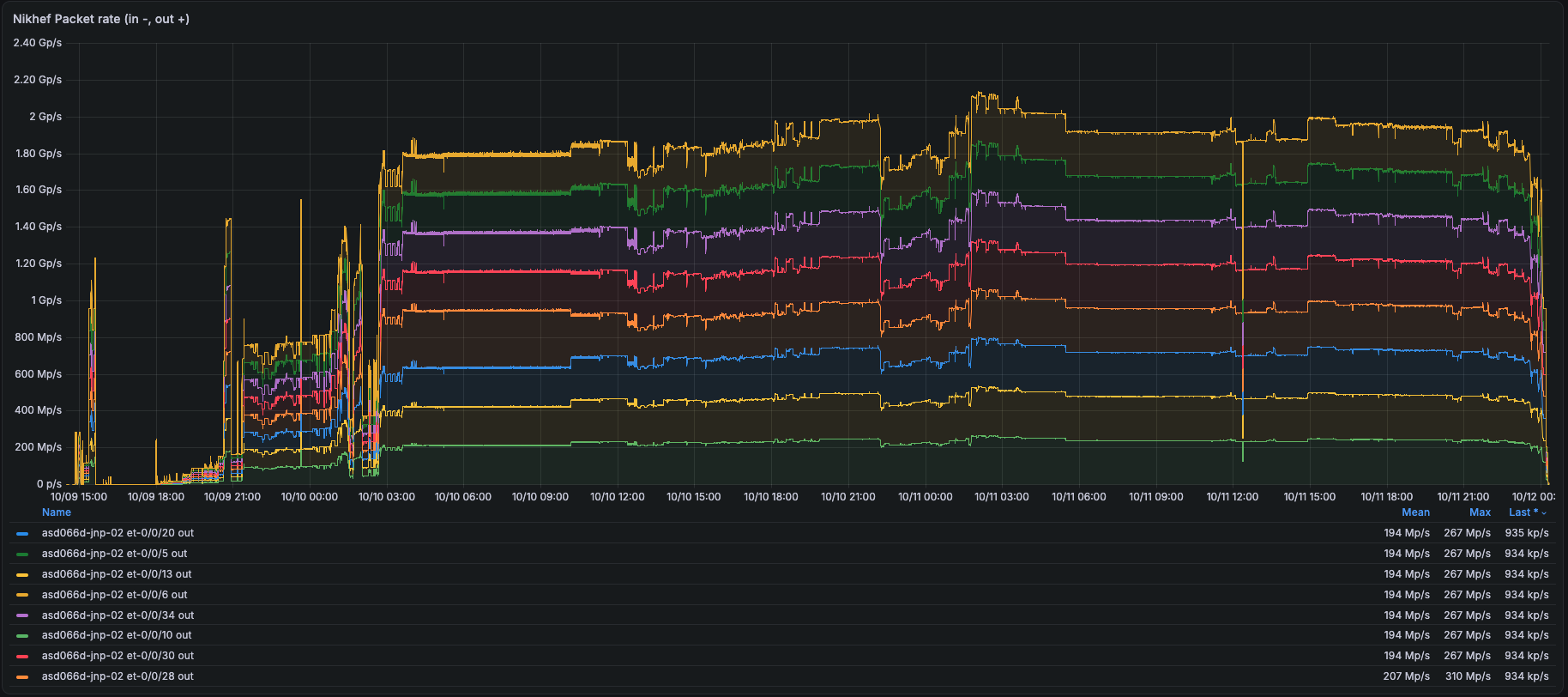
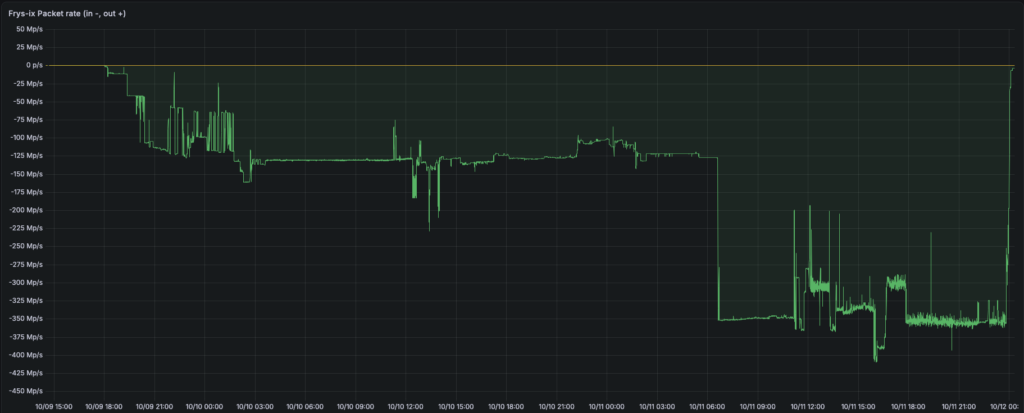
As you can see from the screenshot below, the maximum parcel throughput peaked in the early hours of Sunday 11 October 2026: no fewer than 2.14 billion parcels per second. This graph shows the 8x400G ports that SURF installed in collaboration with Nikhef.
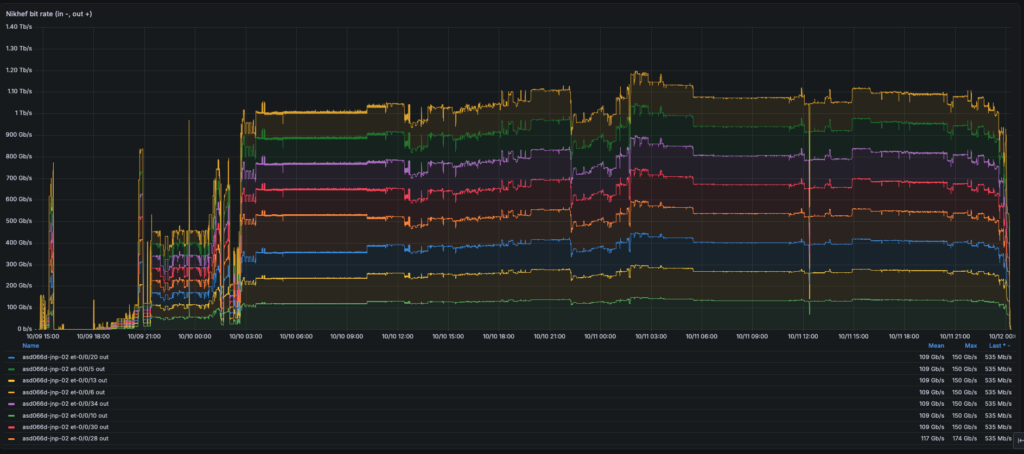
Below is the resulting bit-rate:
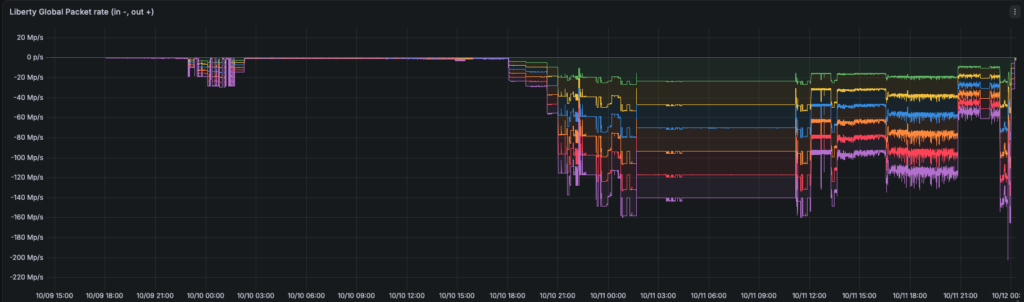
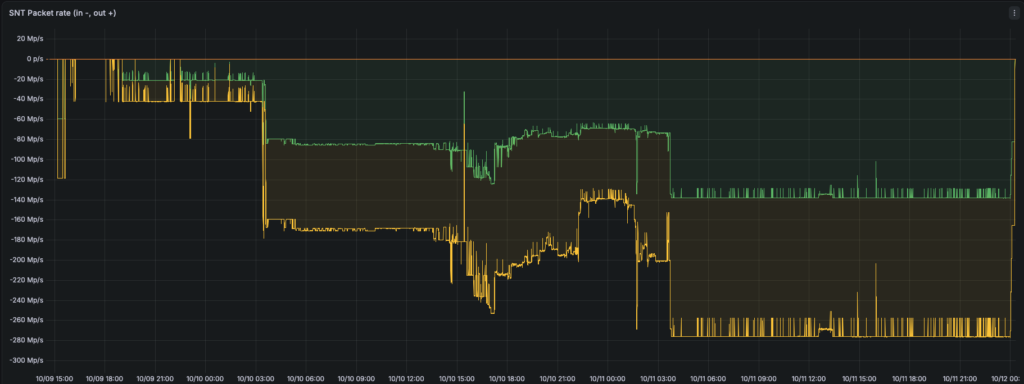
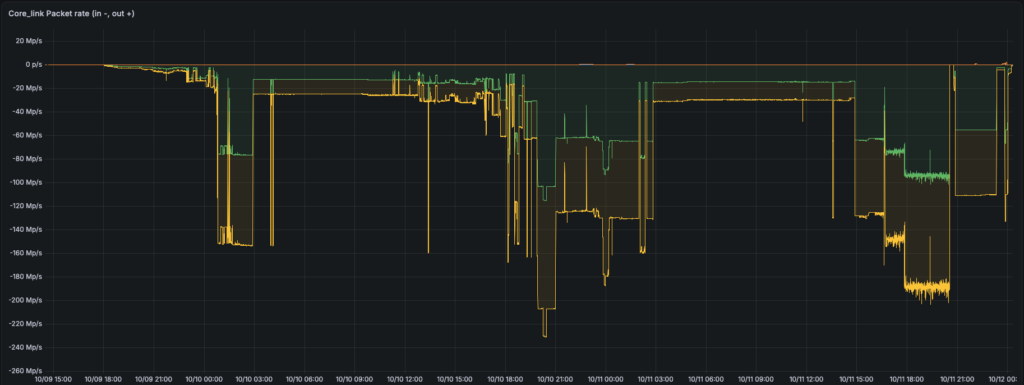
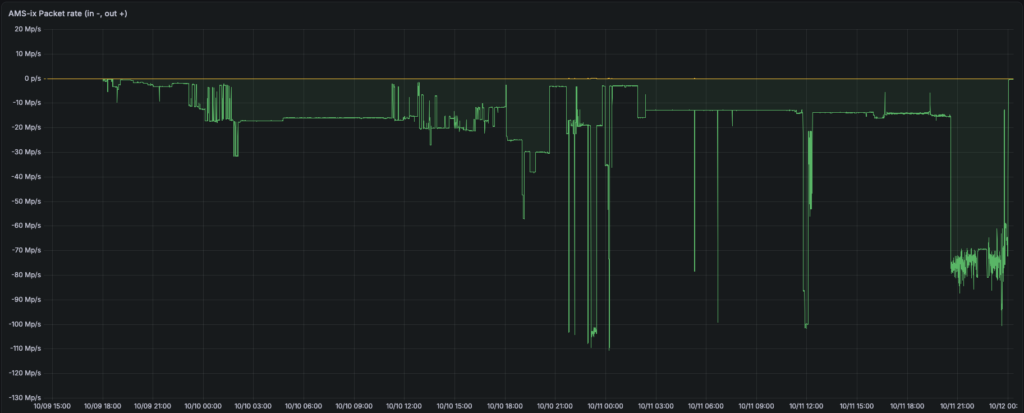
For incoming traffic, various routes were made available, including a number of internet exchanges, transit providers and, of course, the SURFnet Infinity production network:
Result
The result was a weekend full of pixel art, logos and, above all, a great deal of chaos. The best bits can be seen in the time-lapse, which shows the weekend at 200 times normal speed. Meanwhile, the new network proved that it can handle such enormous volumes of traffic without any problems.